
LearningML's Machine Learning Laboratory
LearningML’s Machine Learning Laboratory (Playground) is designed to help students understand, in a visual and hands-on way, how an algorithm learns. For teachers, it is a great tool to move from theory to classroom experimentation in just a few minutes.
You can access it from advanced mode in two ways: from the “Playground” option in the top menu, or from the “Learn about … on ML playground” link in the Learn tab.
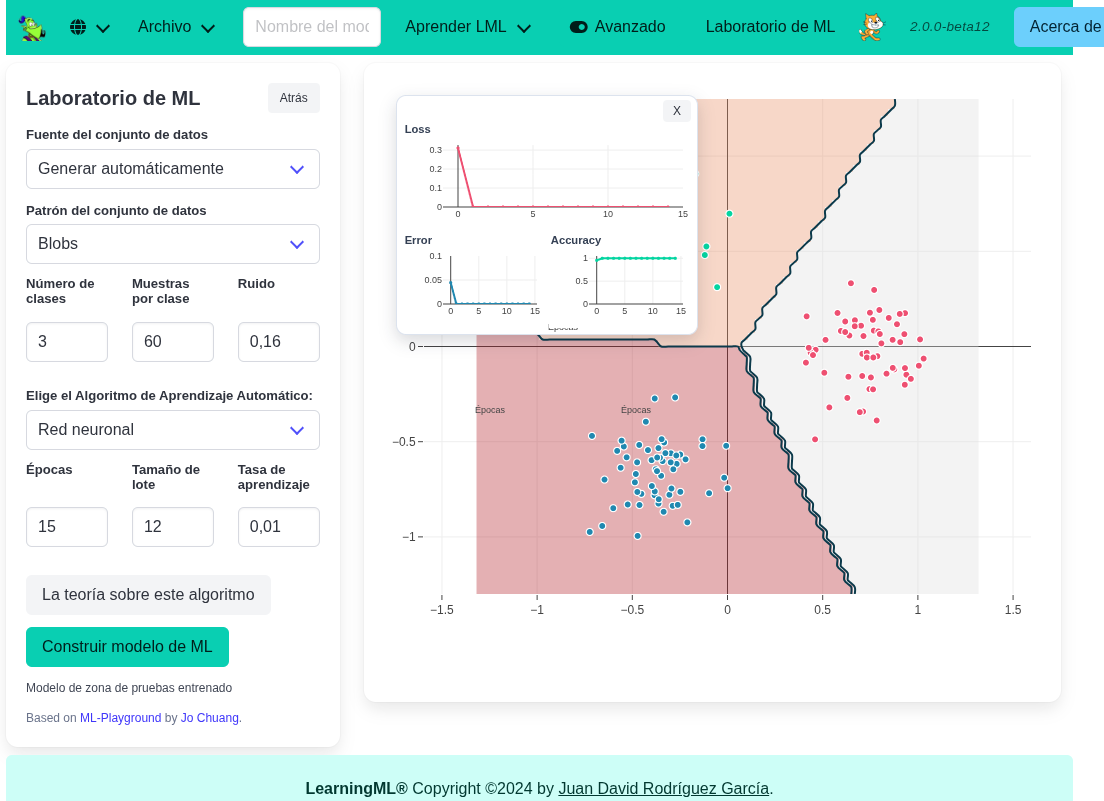
Once inside, the workflow is very simple:
- Create the dataset automatically or draw it manually.
- Choose the data pattern (blobs, circles, or spirals), the number of classes, the number of samples, and the noise level.
- Select the algorithm: Neural Network, KNN, or Naive Bayes.
- Adjust hyperparameters and click “Build ML model”.
On the chart, you can see the points and the model’s decision regions, which makes it much easier to explain why an algorithm classifies the way it does. In addition, with Neural Network, an overlay shows the evolution of loss, error, and accuracy, which is ideal for checking whether learning is actually improving.
And to support classroom explanation, the “The theory about this algorithm” button opens a conceptual guide for the selected algorithm directly inside the editor.
In short: the ML laboratory turns LearningML’s advanced mode into a guided exploration space that is very useful for designing activities where students compare algorithms, test hypotheses, and build intuition about machine learning.
If you have not tried it in class yet, this is a good moment: open the laboratory, tweak parameters, and let your students see Machine Learning in action.